Zyte Data Services
A managed service delivered over email became a product clients run themselves. Time to data fell from 30 days to one.
The problem in front of me
Zyte Data was a real product with real revenue, and its entire interface was an inbox. Clients received their data as an email containing a link to an S3 bucket.
Everything else happened over email too. Requesting a new feed, asking for a rerun, chasing status, getting hold of a sample: all of it went through an account manager, who forwarded it to delivery, who came back with an answer days later. Clients had no way to see whether their data was running, stalled or finished, and no way to look at it without downloading a file first.
The cost showed up in two places. Clients waited, often around a month, to find out whether what they got was what they wanted. And the account management team spent a large share of its week relaying questions that a status field could have answered.
The product worked. You just couldn't see it working.
Zooming out
The obvious brief was "put a dashboard on it." That would have made the same process visible without making it better, because the real problem wasn't presentation. It was the length of the feedback loop.
A client specified a feed, waited weeks, received a file, discovered it wasn't quite right, and asked for a rerun. Every one of those cycles cost delivery time, account manager time and client patience, and the fault was almost never the data. It was that nobody found out early enough what "right" meant.
So I reframed the project around shortening that loop, which turned a reporting problem into a product problem with four requirements:
- SeeStatus without askingLive state of every job, in the app, so the answer to "where is my data" stops being an email.
- EarlySamples before completionShow clients a representative slice while the run is still in progress, so a spec problem surfaces in hours rather than weeks.
- SelfSelf-serve requests and rerunsClients trigger new feeds and reruns directly, with the configuration in front of them rather than described in a thread.
- ReachData where it is neededBrowse in-app, download securely, or pull it via API, depending on whether the person is evaluating the data or piping it somewhere.
What I built
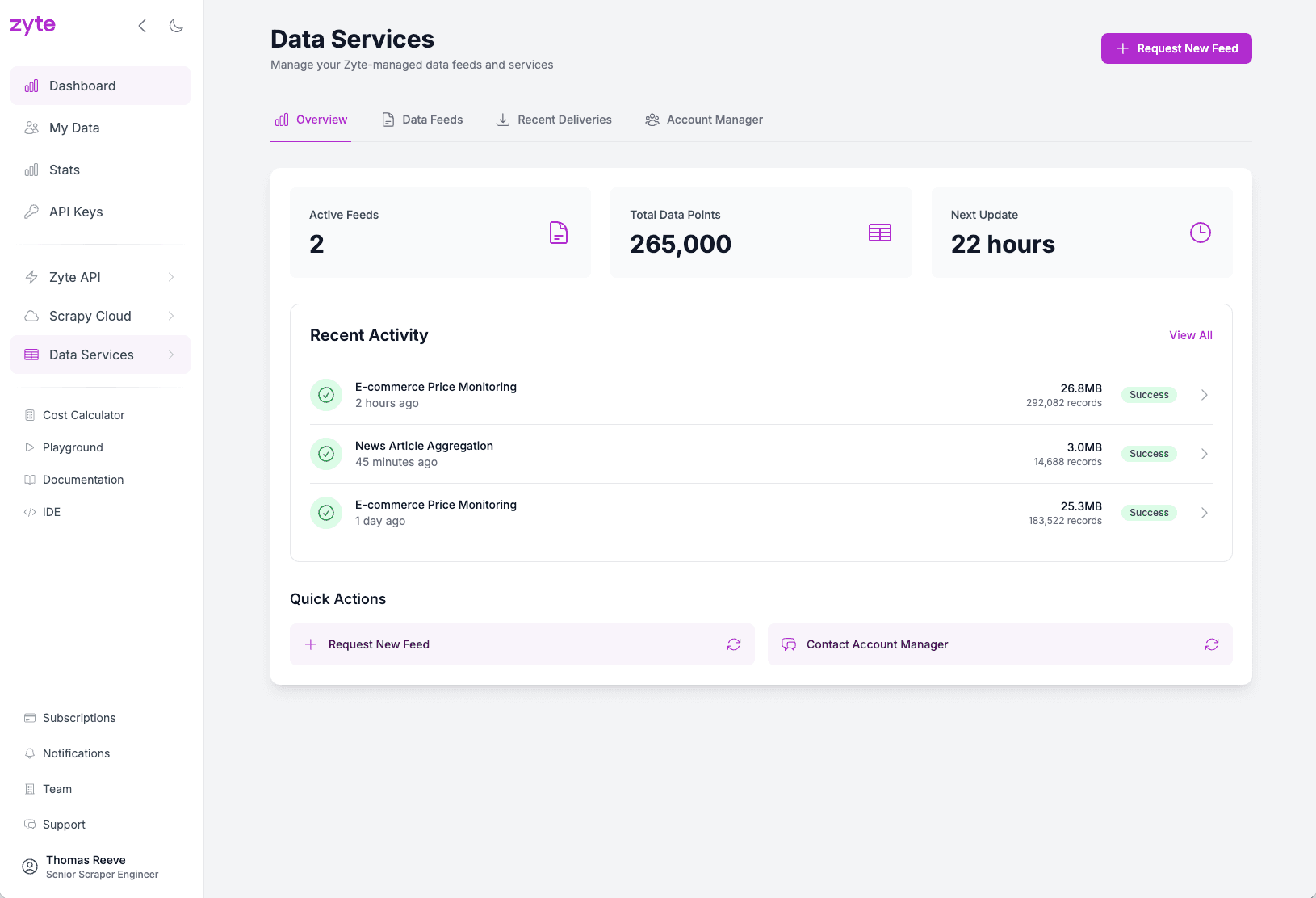
A full data services experience inside the web app: request, monitor, inspect, retrieve. The email became a fallback rather than the product.
Requesting. Clients configure and submit new feeds themselves, and trigger reruns against an existing spec without reconstructing what they asked for last time. The request carries its own history, so a rerun is a modification rather than a fresh conversation.
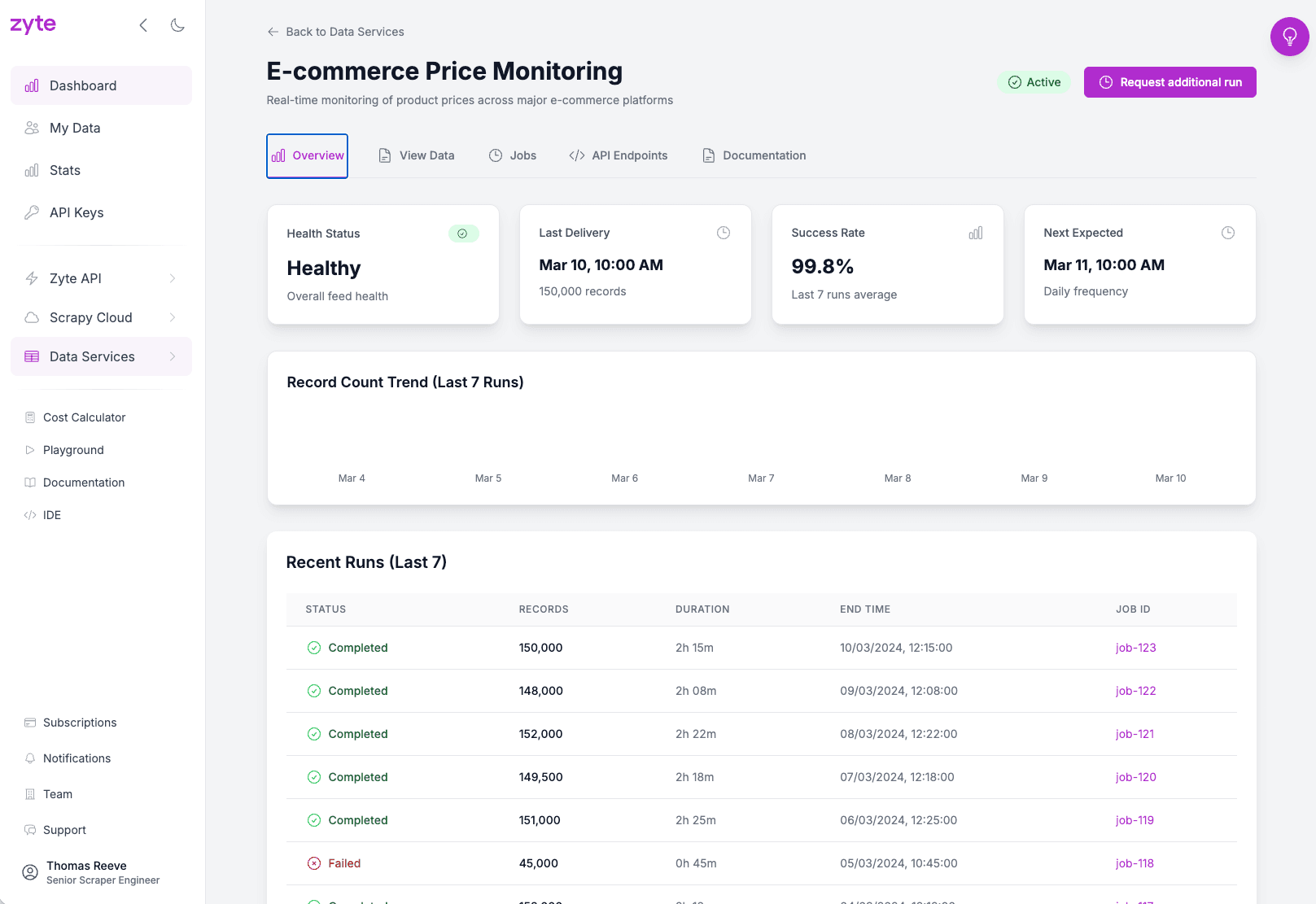
Monitoring. Every job exposes live status against a defined set of states, so progress is legible at a glance and a stalled run is visibly stalled rather than silently late.
Inspecting. Samples surface early in the run, and the full dataset is browsable in the app. This is the part that changes behaviour: clients can evaluate structure, coverage and field quality against what they actually meant, while there is still time to correct it.
Retrieving.Secure download for people who want a file, and API access for people who want it in their pipeline. Same data, two very different users, neither forced through the other's route.
- Request by email to an account manager
- No visibility while running
- First look at the data on completion
- Rerun means another email thread
- Delivery as a link to a bucket
- Request and configure in the app
- Live status per job
- Samples visible mid-run
- Rerun from the existing spec
- Browse in-app, download, or API
The loop the design targets: catch the spec problem while the run is still in flight
The design argument
The efficiency gain here is a design decision, not a delivery one. Showing samples earlier doesn't just make reruns faster. It reduces how many reruns are needed at all.
A rerun is usually a specification failure discovered late. If a client sees representative rows while the job is still running, the mismatch between what they asked for and what they meant surfaces at the point where correcting it is cheap. Move that moment earlier and a whole class of rework stops existing, which is a better outcome than processing the rework efficiently.
The same logic applies to the second audience. Every status field is a question an account manager no longer has to answer, which is why this was never only a client-facing project.
- TwoTwo audiences, one surfaceClients wanted control and visibility. Account managers wanted their week back. Designing for the client's self-service directly removed the internal team's queue, so I didn't have to build an internal tool to fix an internal problem.
- EarlyPartial data over perfect dataShowing an incomplete, representative sample risks a client judging the output before it is finished. Worth it: the alternative is a client judging it a month later, when the only remedy is a full rerun.
- StateHonest states, including bad onesThe status model exposes stalled and failed runs rather than smoothing them into "in progress". Visible failure erodes less trust than invisible delay, because the client can act on it.
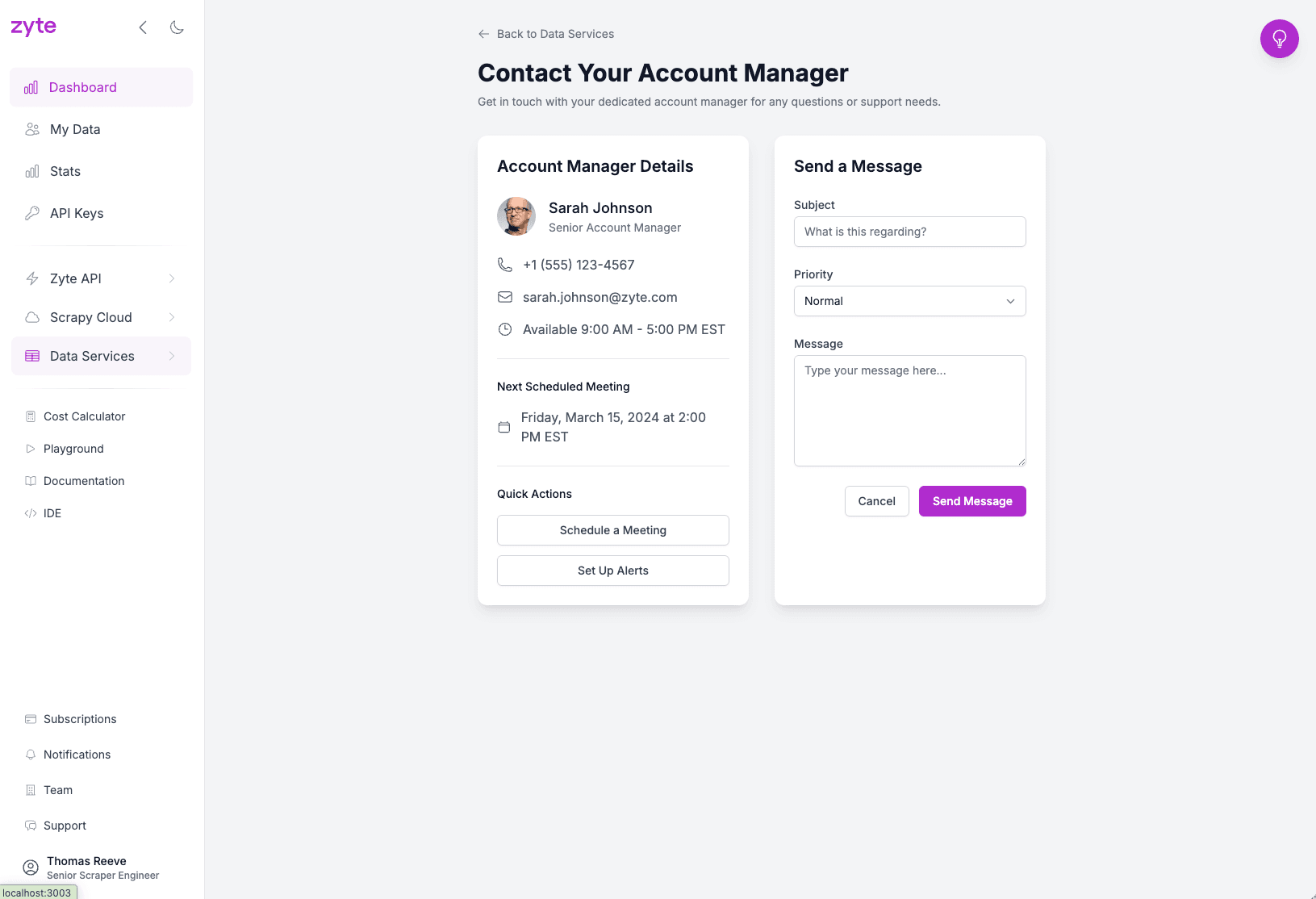
- KeepKeep the human route openSelf-serve replaced the routine traffic, not the relationship. Complex or bespoke requests still reach an account manager, which is what makes the automation safe to lean on.
The outcome
The churn number is the one I care about most, because it explains the others. Clients were not leaving over data quality. They were leaving over the experience of not knowing, and of waiting a month to find out they had to wait again. Removing the wait removed the reason to go.
The volume increase came from the same place. When requesting a run stops costing an email thread and a fortnight, clients run more of them, which turns a service relationship into product usage. And the drop in account manager contacts moved a team from relaying status to doing work that needed a human, without anyone being asked to work differently.
The brief was a dashboard. The problem was a feedback loop, so I shortened it, and the rework stopped happening rather than happening faster. Design the loop, not the screen.